Creative Imaging Workshop

Your work is to discover your work and then with all of your heart give yourself to it. – Buddha
You don’t see things as they are.  You see things as you are. – Talmud
Creativity involves breaking out of established patterns in order to look at things in a different way. — Edward de Bono

Charles Bowers offered members of two central Maryland Camera Clubs the opportunity to work with him and each other out of his home studio to discuss, practice and expand the creativity of their images.  A dozen folks took him up on the offer, 7 from the Baltimore Camera Club.  We will meet approximately monthly and had our first meeting in January.

As you might expect for the first meeting, we introduced ourselves, showed a little of our work, went over the rules, and got our first assignment.  We had filled out a survey of topics of interest before class, and composite images were high on the list so that is where we started.  We were given a Base-Layer-imagebase image and six other images. The rules were that we had to use the base image, should use at least three of the others, and couldn’t use any outside images.

So I worked on the assignment, Dropboxed several different attempts, and got some comments back from Charles after a couple of days.  The comments were helpful, but indicated that I had not adequately achieved my intent.  Charles reasonably suggested that the cross was too big, and the white birds should have some detail.   I was trying for a “surrealistic”Base-Layer-imageV2 image and that apparently did not come through.  I started to write back, and then stopped, and asked myself whether I really knew what surrealism was. So before potentially embarrassing myself, I looked up surrealism.

And this is the real point of this rather extended narrative:  That I stepped away from a narrow focus on photography and looked into the history, background and thinking behind the kind of art I thought I was doing.  That has broadened and deepened my thinking about my personal vision, where I might go in the future, and what skills I might want to sharpen.

Base-Layer-imageV4

This insight alone has been valuable.  I bought a used book on Dali, one of the more famous surrealists and will continue to broaden my horizons.  Google+ has a Surrealism and Fine Art community with amazing images that will really stretch your mind, which is what creativity is all about.

So I took most of Charles’ comments and lowered the clouds so the top wasn’t cut off, moved the peasants up in the picture so they had feet.  Left my “ghost” birds as they were, and added an even larger cross shadow pointing right at the peasants to try and indicate, in a dream-like way, the relationship between religion, spirituality and a rural way of life.  Given the limitations of the assignment, I am reasonably happy with this result, but still have time to add more ideas.

As always, comments are welcome.

Tagged | Leave a comment

In Defense of Desktops

But sometimes, when all our energy goes into progress, acquisition, and productivity, it leaves a huge emptiness of the heart.  —  John O’Donohue

I work part time for a company that helps businesses or government develop sustainable solutions to business challenges, so I often think for myself about how to act sustainably in my life.  At this time of year electronics are widely advertised and people are often eager to trade a perfectly acceptable device in for the newest version, despite the cost, the lack of a real need, and the hassle of transferring data.  Buying a eSATA card for my desktop, got me thinking about the fact that I have had my desktop since 2007, but it is still perfectly serviceable, despite higher software requirements because it can be upgraded easily and inexpensively.

The popularity of desktops has greatly decreased in the face of cheaper, more powerful laptops, but I hope that manufacturers will continue to make desktops available for three reasons:  (1) it is much cheaper to upgrade a desktop than buy a new laptop, and (2) despite the increased capabilities of laptops, desktops still provide more processing power per dollar, and (3) given the environmental impact of computer technology we should use them as long as practical and then recycle or reuse them.  The money I don’t spend on computer technology I can spend on lenses and travel.

I bought a Dell T3400 workstation in 2007 and it is still going strong, because it provides space and opportunity to inexpensively upgrade and add connections.  I have:

–  Doubled the memory from 4 to 8 GB.
–  Increased the speed and capacity of my C:/ drive by putting in solid state drive or SSD (which is amazingly fast and really worth the cost of about $150 depending on size).
–  Added USB3 ports for faster downloading.
– Added a more effective wireless card.
– Added an eSATA port (just recently, which got me thinking about this).

I did everything myself except for the SSD installation at relatively minimal cost — certainly much less than buying a new laptop to keep up with speed and storage demands.

Planned obsolescence of laptops is certainly advantageous to manufacturers, as is making it expensive or difficult to upgrade, but is it in your interest?  All that said, I do have a laptop and would be hard pressed to get by without it.  Nevertheless, I will likely replace my desktop when it is necessary, rather than getting by solely on a laptop.

Your thoughts are welcome.

Tagged , , , , | 1 Comment

Autofocus Calibration

There is only you and your camera. The limitations in your photography are in yourself, for what we see is what we are. – Ernst Haas

I have had my D800E for about two years. It can give incredibly sharp results with good lenses, but too often images didn’t seem as sharp as they could be. I always blamed myself. I used a tripod, a cable release, mirror up. I made sure that the auto focus spot was right on that eye or other focus point, and the little round dot said it was focused.

Well it still wasn’t focused…or my fault. The autofocus calibration was off. Tam Le from the mid-Atlantic PSA gave a talk on bird photography back in July at the Baltimore Camera Club and he emphasized the need to check your focus calibration. I finally bought a Lens Align MKII Focus Calibration System (Lens Align) to check it. The calibration system was essentially two parts: (1) an alignment target to assure that the sensor was parallel to the device and (2) an inclined ruler to help you see the depth of focus. It seemed over-priced (about $90) for what it was, but it did show me that my camera consistently and significantly back focused with all of my lenses, i.e., instead of about one third of the depth of focus being in front of the focus point and two thirds behind the focus point, virtually all of the sharpness was behind the focus point. This did not happen when using Live View to focus.

The D800E has an autofocus fine tune menu function that allows for some adjustment, but even at the maximum adjustment, the camera was back focused, so I decided to send it back to Nikon for adjustment. I have had the camera for more than a year, so it is out of warranty and it cost me about $250 at Nikon for the adjustment (which included a cleaning of the camera and sensor, and firmware update) and return postage. I insured it to send it in so add another $25 for my shipping.

Lens Align autofocus calibration device

Lens Align autofocus calibration device

Happily, when I got it back, the focus calibration appeared to be right on. I haven’t yet gotten out into the field to really test it, but the Lens Align provides a good indication that my focus should be better from now on.

If your autofocused shots seem to be a little less sharp than you think they should be, or the sharpest point isn’t where you thought you placed it, you can probably begin to check with just an inclined yardstick, with a narrow piece of tape across it. Put the tape across the ruler perpendicular to its length. Draw a line on the tape, focus on the tape. If the focused field isn’t about 1/3 – 2/3 in front and behind the line respectively, you may need to get your autofocus calibrated. If it is close, your camera may allow you to adjust (mostly higher end cameras have adjustment capability). If it is far off as mine was, you might consider sending it in for service.

Dec. 25, 2014
Update: It was so nice outside, I abandoned my family after Xmas breakfast and presents to shoot a little at Fells Point and test it out.  After a moment of panic, in which nothing would focus, I realized the diopter needed to be readjusted (does your camera have an adjustment for your vision and is it properly set?) and when that was fixed everything was fine.  Somewhat embarrassing that  after all of the years I have been shooting I didn’t realize sooner that the autofocus was off.  Many shots may have been better if I had.

Realized when downloading that Nikon reset my file naming convention, color space and bit depth.  Needed to reset.

R

Tagged , , , , | Leave a comment

Paul Strand and the Philadelphia Museum of Art

…And someone stained the glass for light to pour through, washing the set stones in color. — Linda Pastan, Carnival Evening, excerpted from Anon. for Gil

Stained glass window in the Philadelphia Museum.

Philadelphia Museum

Philadelphia Museum steps during Paul Strand exhibit.

I attended the Paul Strand exhibit at the Philadelphia Museum on Dec. 17, 2014.  The exhibit is open until Jan. 4, 2015.  I was very impressed with the Museum, less so with Paul Strand’s photography.  It could be simply a different aesthetic, but I thought most of the prints were too dark, although I concede that he did retain detail even in the shadows.  Also, many of the prints were platinum, which doesn’t have a bright white, making the overall print seem darker. Most of the earlier prints were platinum with a sprinkling of gum bichromate and palladium prints throughout the exhibit.  The more recent work was silver gelatin.  The prints in the catalog book of the exhibit were much lighter and more in line with today’s printing approach.

Certainly his photographs were ground breaking at the time he made them, but I don’t think his work has stood up as well as the work of Cartier-Bresson, for example.  His iconic image of a blind woman was noteworthy (also printed with a broader tonal range).  The “Conversation,” apparently one of his lesser known works, I thought was one of his better images, despite being printed extremely low key.  His work from Mexico, Egypt and Ghana is all very good.  The work from Maine did not excite me.

In my opinion he left a lot on the table from the Hebrides and judging from what he did do, I believe it must have been photographically richer than that body of work would suggest.  In some ways, in the capture of a culture and an age from Luzzara, Italy, and from France, his work seemed to me to be analogous to some of the Farm Service work of Walker Evans and others.

The museum itself  offered a lot.  It is moderately priced, but we were able to cut that in PhilaMuseum_DSCN1588half by using a Groupon coupon, which the  museum readily accepted.  Parking is not too expensive for a major city at $12 for the first four hours and $2 for each additional hour.  I think the exhibit is worth seeing, even if I wasn’t impressed –  only my opinion and history has decided otherwise.

Regardless of the photography, the company was absolutely top notch.  Thank you all for a great day!


Tagged | Leave a comment

Jeffers Project

The most effective actions are those conceived in the wisdom of clarity.  – Sylvia Boorstein

Robinson Jeffers was a poet who worked on the central California coast from the 1920s through the 1950s.  His poetry often emphasized ecological themes, addressing the wholeness of earth and that man is part of the ecosystem, rather than separate from it.  I first became aware of Jeffers’ poetry from a book titled “Not Man Apart” that combined Jeffers’ poetry with the work of several famous photographers also working on the California coast at the same time, including Ansel Adams, Edward and Cole Weston, Philip Hyde, William Garnett, Cedric Wright, Steve Crouch and others.

Jeffers writes of man’s destruction of the earth:

…remember that civilization is a transient sickness.

…remember that civilization is a transient sickness.

Through wars and corruptions the house will fall.

Through wars and corruptions the house will fall.


Mourning the broken balance, the hopeless prostration
of the earth
Under man’s hands and their minds,
The beautiful places killed like rabbits to make a
city…

But also of the earth’s beauty:

…but to fling
Rainbows over the rain…
And beauty above the moon, and secret rainbows
On the domes of deep sea-shells,
Not even the weeds to multiply without blossom
Nor the birds without music…
Look how beautiful are all the things that He does. His
signature
Is the beauty of things.

I find Jeffers’ poetry moving and insightful, and often very well-informed technically and scientifically; I connect with his subjects and his metaphor.  I am starting a new project to illustrate verses from Jeffers’ short poems with my images.  The images will perhaps not address the environmental/ecological issues as broadly as did the Sierra Club in Not Man Apart, but I hope that the combination of images and text will be more compelling than either of them separately.  I have organized approximately 75 verses I wish to illustrate into the following categories:  Man Destroying Earth, Beauty, Gulls, Ocean, Metaphor, and “everything else.”

In some ways I have been considering a project of this type for a long time.  I have over 50 pages of quotes, and you  may have noticed that I start most blog entries with a quote. In this case, part of the intent is to focus on a specific project and better develop a personal style and vision, by going out with purpose rather randomly taking (rather than making) images that catch my attention.  I need to do more making and less taking.

These images are very much exploratory — proof of concept images, so I would greatly appreciate any comments that might help me to improve the project.

Old stone building covered in part with ivy and forest growing around it.

Now the spoiler has come …It has all time.
It knows the people are a tide
That swells and in time will ebb, and all
Their works dissolve.
— Robinson Jeffers in “Man Destroying Earth”

Tagged , | Leave a comment

Please Bug Me

Here were creatures so exquisitely fashioned that they seemed unreal, their beauty too fragile to exist in a world of crushing force. — Rachel Carson

It’s turning into a buggy summer as I ramp up my macro work.  North Point State Park in southeast Baltimore County turns out to be a pretty good place for dragonflies (credit to Lynn Roberts for the location).  So far I haven’t found much diversity, but I have only been there once.  Eastern Pondhawks and Blue Dashers predominate.  It is a good place to practice, because there are so many, but of less interest if you want to expand your files NeedhamsSkimmer-(67)with new species.  I did find a tentatively identified Needham’s Skimmer, which is new to me.


Font Hill Wetland Park near Ellicott City, MD is another good place for dragonflies (and a damselfly).  Greater diversity (so far) than at North Point, with fewer Eastern Pondhawks, but still plenty of Blue Dashers.

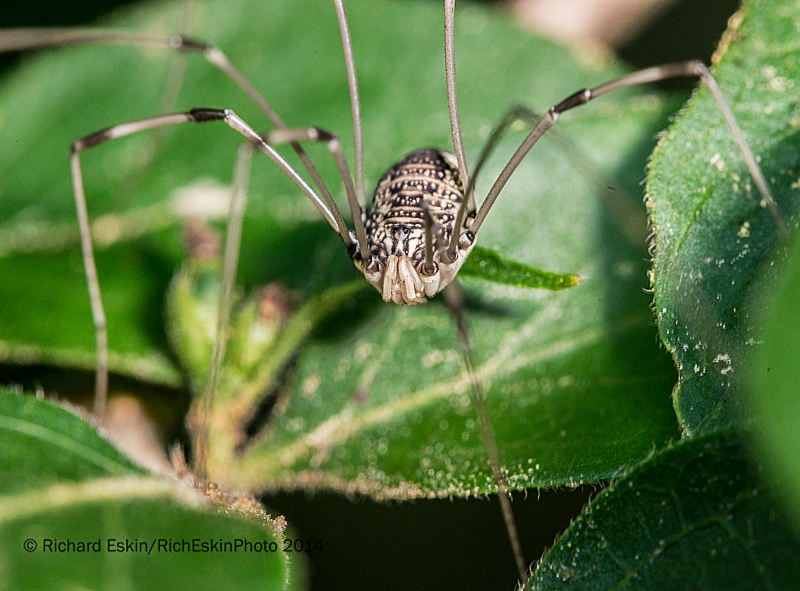
EasternAmberwing-(9)cropped EbonyJewelwing-(13) WidowSkimmer-(1)Got the eastern amberwing, ebony jewelwing and widow skimmer there (left to right). The headstand of the amberwing is to try and reduce temperature either by exposing less profile to the sun or self-shading. Backyard butterfly garden yielded the snowberry clearwing; the h_D8E2744Harvestmanarvestman was on some bushes in the back.  The fly is a holdover from North Point.

Fly-(4)

Many of these were taken with the Nikon 200 mm micro lens with a Tamron 1.4 x telextender.  The lens has exceptional sharpness and is well corrected; when I add lens corrections in ACR, there is virtually no change.  The combination gives good reach, with excellent sharpness.

Tagged , | Leave a comment

Behance Portfolio Review

The fear of being laughed at makes cowards of us all. – Mignon McLaughlin

On Saturday I participated in a Behance Portfolio review hosted by Chris, Jon-Michael and Breck at The Bindery in southwest Baltimore. Behance is an Adobe program/website for sharing your work and getting feedback. Like many other sites, there are buttons for people to follow you and like your work.  The differences are that this site is targeted to creatives that use Adobe products and provides an option for “work in progress” so that you can get feedback as you work. This portfolio review is completely supportive of that concept. It isn’t necessary that you have a Behance account or portfolio to participate, and you can just link to your own website or come just to participate. Participation is free.

There were only five of us and the hosts: Clint, Meagan, Vicky, Rachana and me. It was a pleasant evening (Chris supplied beer, chips and dip — thank you Chris), and a very supportive and positive group. It was also diverse:  I did photography, Vicky is the producer for codebass radio, Clint is a junior at MICA and a really excellent illustrator, Rachana is an exceptional Indian artist and Meagan is just getting back into creative work after several years as a care giver. Each of showed some portion of our work or explained what we did and got feedback from the others.

After we talked about our work, Jon-Michael, Breck and (a little reluctantly) Chris shared their work. Jon-Michael does fashion, commercial and portraiture, Breck does retouching, great composites and HDR, portraiture, fashion and fine art. Chris is semi-retired from band photography. All of them had great portfolios, and as the photographer among the guests, I probably benefited the most.

Chris also gifted each of us with his distinctive, high quality Write Notepads and we ended the evening with a really interesting tour of the printing presses, which brought back some memories for me having taken print shop in high school, and surprised me at how much I remembered. This Behance portfolio review was really worthwhile for networking and meeting other creative people in the community and for the feedback and support we received.

Tagged , | Leave a comment

Second Wildflower Pilgrimage to West Virginia

Bread feeds the body indeed, but flowers feed also the soul. — The Koran

It was the 53rd Wildflower Pilgrimage in Davis, WV, but our second trip.  The Blackwater Inn in Davis was the host. This year my wife and I chose two different trips and spent part of Sunday at a third choice before coming home.

Cranesville Swamp

This Nature conservancy location straddles the Maryland/West Virginia border. It is a relict community that is left over from the ice age because this West Virginia area is cold enough to maintain a boreal environment, at least so far, if climate change doesn’t make that impossible in the future. I had entered from the Maryland side previously and wasn’t aware that there was a boardwalk through the bog accessible only from the WV side, which is where went this time. This is one of the advantages of the Pilgrimage:  people who really kRoundLeavedSundewSF2now the area can show you the best places and help identify the flowers and birds. Because of the cold spring, some things that might normally be in bloom weren’t.  I was able to get one very nice sundew.   Others saw some water snakes playing in an open area.  Numerous flowers along the trail.

You can get travel directions from the Nature Conservancy website for Cranesville Swamp.

Cathedral State Park

Jack-in-thePulpitSF1The second half of the first day was spent at Cathedral State Park.  I had been there before, but this trip was disappointing because it was rather dry and more open than usual due to storms that pulled down some old trees.  This park has some really magnificent old hemlocks. It also has the biggest dandelions I have ever seen.  Cathedral State Park is well-marked on most maps and you enter off of Route 50 in Aurora, WV.

Otter Creek Wilderness

On Saturday we went to Otter Creek Wilderness.  After a short trail hike there is a somewhat shaky bridge over Otter Creek. It is a replacement for a swinging bridge taken OtterCreekCascade3down at high water.  A bit after the bridge there is some rough trail climbing over rocks with some muddy spots for about a quarter mile, but then the trail smooths out with Painted Trilliumsome very nice wildflowers. A small wadeable stream crosses the trail about 1 mile in with some very nice little cascades a short ways upstream.


 Fernow Experimental Forest

We were on our own on this one, and with another couple mistakenly drove up some pretty rough trails before turning around and getting some better directions.  We stopped at only one location, near some maintenance buildings and a low water bridge.  Around the bridge were gobs of Showy Orchis and other wildflowers.  A really nice location.

ShowyOrchisSF3In Parsons, make a left at the Subway shop and then almost immediately another left. Car GPS coordinates for a little ways into the forest was:  N 39.07997° and W 079.64925° (you are on your own with these directions),

Tagged , | Leave a comment

Waterfalls and Lakeshore Near Baltimore

If you are out there shooting, things will happen for you. If you’re not out there, you’ll only hear about it. – Jay Maisel

As a nature photographer I sometimes feel a bit stranded here in the populous mid-Atlantic. Yes, there are great areas in West Virginia and Shenandoah, parts of western Maryland aren’t bad, and there are some good areas northeast of Harrisburg.  But what if I just have a few hours?  I recently found, or re-discovered three areas, all water-related with the help of the Hunt Valley Photography Club, which is really a meet-up, more than a typical camera club.

Cascade Falls in Patapsco State Park.  The first one is the small falls in Patapsco State Park on the Cascade Falls Trail. I had been there before, but was having trouble finding it again.  Take I-95S from I-695 to I-195 E to Route 1 (the first exit off of I-195). Normally you could go a very short distance to turn right South St. and bear left onto River Road, but that exit is currently closed for construction, so continue south on Route 1 (Washington Ave.) to the next light at Levering Ave., make a right at the light and bear right to continue onto River Road, which is currently unpaved or partly paved.  Go past the first playground on your right and continue about 2 miles to the building on your left the bridge on your right and a parking lot just past the building. CascadeFallsPan1 The trailhead is between the building and the parking lot or an alternate trailhead at the far end of the parking lot. From either trailhead go to your left.  In just about 100 yards you can see some cascades across the valley. Continue another 100 yards to the falls.  The trail continues left around the falls. The coordinates for the parking lot are:  N 39° 14.478′   W 076° 45.034′.

Kilgore Falls. This falls is located in the Falling Branch Road part of Rocks State Park, and is NOT shown on map 3 of my 1992 version of the Harford County ADC map, but is off Clermont Mill Rd on Falling Branch Road, southwest of the itnersecton of Rocks Rd. (Route 24) and Harkins Rd (Route 136).  You can find more information at Falling Branch Trail to Kilgore Falls, the Maryland Geological Survey and Harford County. The hike begins from the parking lot at N 39° 41.403″  W 076° 25.365″. At the trail fork, if you go left, you KilgoreFalls (3)can cross the stream at some steppingstones to reach the other side and get to the base of the falls.  I went after a strong rain, and the stream was a bit too high to safely cross.  If you go to the right at the trail fork, it takes you to the top of the falls, where this picture was taken.  You can cross here too, and it is narrower a single mid-stream hop, but the flow is also greater. The address is 1050 Falling Branch Rd., Pylesville, MD 21132 according to my Garmin GPS.

Peerce’s Cove.  This area is a sandy beach area on Loch Raven reservoir facing west across the lake.  To get there, take the beltway to exit 27 north (Dulaney Valley Road).  After a few miles, you will go over the reservoir bridge and approach the traffic light…at the light you will stay to the right on Dulaney Valley Road.  After that split, you will drive for maybe a mile or so until you pass Peerce’s Plantation restaurant on your left.  Once you pass the restaurant, stay to your right when the road splits…the road then becomes Loch Raven Drive.  LochRavenSunsetzAfter another mile or so on Loch Raven drive you will see Morgan Mill Road on your left, the cove will be on your right about 0.2 – 0.3 miles further. You can park your car on the street right by the cove.  If you reach the bridge, which is a few hundred yards past the cove, you’ve gone too far.  There is also parking on Morgan Mill Rd., right off Loch Raven Drive.

Tagged , | Leave a comment

Upgrading to Photoshop CC

Robert Frank in a fellowship application:  “The project I have in mind…will shape itself as it proceeds and is essentially elastic.” — Geoff Dyer “The Ongoing Moment”

Since Photoshop is my primary tool for photography (after capture), I thought it would be worth the $120 per year to move to CC and wanted to lock in the $9.99 subscription price which expired on Dec. 31 for the basic photography package. I usually upgrade for each revision, although not immediately.  Since the upgrades were typically $200, and I upgraded about every 3 years, I was spending about $65 a year cost averaged, so this doubled my costs, but $65 a year is not all that much for something I really enjoy.

I am actually very satisfied with PS CS6, but was thinking long term.  Some of the new features like improved sharpening and Upright were also attractive. So I signed up in December, but didn’t do anything about it until January, when I tried to start downloading the new CC version.

Surprise!  Photoshop CC runs only on Windows 7 and 8, I would need to upgrade my Vista operating system. (I have no idea what the situation is with iOS.) Cost just more than doubled with $139 for Windows 7. However, since my laptop was Windows 7, I wasn’t too upset, because, if there is a reason, having the same OS on both computers was probably a good idea.

While waiting for the software to arrive I googled “Vista to Windows 7” to see what I was facing.  There is an “advisor,” that reviews your entire system, and points out possible problems.  Happily, nothing significant.  Also did a complete back up of C:/ and D:/ drives to an external drive.  Let each one run overnight.  I even remembered to reset automatic sleep, so it wouldn’t shut down midway.

When I got the Windows package it said that this version of Windows should only be used on new computers.  Well obviously I was upgrading and the computer wasn’t new.  I checked to see if there was a different version on Amazon.  No, this was the only choice.  If I opened it, I couldn’t return it.  I dithered for a week or two and then opened it.  There were two choices, one to click on an automatic upgrade, so it wasn’t going to be a problem, but the packaging was sure misleading.  An entire afternoon was spent migrating to Windows 7, and then additional time updating various drivers.

Next step:  I definitely wanted to be able to go back to my Photoshop CS6 if they raised the CC price significantly, so I needed to deactivate Photoshop before uninstalling if I wanted to be able to re-install later without a problem.  No problem.  But where do I deactivate Lightroom?  Got on Adobe chat –  Lightroom doesn’t need deactivation, just uninstall and reinstall.

Next, the Adobe download site, which was very clear and indicated which programs were available for install.  I needed to download and install three programs:  Photoshop, Bridge and Lightroom.  Bridge was a separate program and didn’t download and install automatically with Photoshop.  There were some other programs available as part of the subscription, but they were for things I didn’t do like mobile programs.  The info button describing their function was actually very helpful.

Finally, opened Photoshop and made sure the preferences were set the way I like them.  I did move to a darker background.  I had stuck with the light gray when given an option in CS6.  Photoshop and Bridge are working fine; I haven’t opened Lightroom yet because I am running out of room on my desktop and purchased an NAS (Network Attached Storage) device which would work like a mini-server.  It comes with RAID software so it would simultaneously create a copy on a second drive, in other words, I bought 8 TB of drive space to get an effective 4 TB of storage and an immediate backup.  When everything is transferred, I will establish a new Lightroom catalog from scratch. That is why I am waiting on LR.  The NAS is connected to my router, so I can access it from desktop or laptop from anywhere in the house – I have my own cloud.

Next adventure, setting up, installing and migrating to the Synlogic DS214+.

PS (that’s postscript not photoshop): Adobe sends an email each month when they bill my credit card.

Tagged | Leave a comment

Multi-image Photography: Part IV – HDR

The secret of a good photograph—which, like a work of art, can have esthetic qualities—is its realism … Let us therefore leave art to artists and endeavor to create, with the means peculiar to photography and without borrowing from art, photographs which will last because of their photographic qualities.” — Albert Renger-Patzsch

High Dynamic Range photography combines multiple images with bracketed exposures to compress the brightness range of scenes where very bright areas and very dark exceed the capture range of the sensor.  In such scenes an average exposure might result in shadow or highlight areas without detail (highlights completely “blown out.)”

With film, if there were foreground/background brightness differences, such scenes might have been clumsily handled with a graduated neutral density filter (of course grad filters can also work for digital photography, but HDR is far more flexible).  These filters would have half their areas darkened by the equivalent of 1, 2 or 3 stops with a neutral gray that wouldn’t change colors or tones, and the remainder clear.  If you had for example a sunset that was sufficiently bright that a proper exposure left the foreground dark, you could use this filter to hold back light from the sky and even out the exposure.  This worked fairly well where you had a straight horizon, but not so well in more complex situations.  Another solution to long tonal range was to “expose for the shadows and develop for the highlights,” which worked well for black and white film but not so much for transparencies. Using flash or fill flash and dodging and burning in the darkroom were other means of handling scenes with long tonal values.

One of the draw backs of HDR is that the subject and camera need to be still or you capture the movement through the bracket set.  This is called ghosting. A common ghosting problem for example is the movement of clouds in the sky.  Several of the programs that do HDR can now handle some ghosting by allowing you to pick a particular exposure from the set to use for areas that exhibit movement.

A typical DSLR sensor can capture a range of about 9 stops.  Black and white negative film can capture about 13 stops and a view through a window from a dim interior to bright sunlight would be about 12-14 stops.  On the other side of the process, the best possible paper is going to able to portray only about 7 stops (Freeman).  So somewhere in the process there is need to compress the brightness  range of high dynamic range images.

When planning to shoot for HDR processing it is very helpful if you have tripod so that the images, especially those with the longest shutter speeds can be properly aligned.  If you don’t have a tripod, increase your ISO if possible so that even the longest exposures will be steady (this will add noise to your darkest exposure).  Bracing against a solid object such as a fence post or tree can also help to avoid camera movement.  Setting up an auto bracket now becomes more important so you don’t move the camera to make adjustments, but can just press the shutter the requisite number of times.

Set your exposure to manual and adjust the exposure using only the shutter speed.  If you change the f-stop, the foreground/background focus may change, decreasing sharpness in the final image or making alignment more difficult.

The number of exposures will be dependent on the total range over which you make your exposures and the steps in between. Being sure to fully capture shadows and highlights will determine the range.  Usually steps of 2 stops will be sufficient.  You can start with your shortest exposures (the histogram is bunched to the left) so that the rightmost histogram values are to the left of the center of the axis.  Lengthen your shutter speed in two stop increments (expose to the right) until the histogram is bunched up on the right and the leftmost values are to the right of the center of the axis.

To facilitate processing in Photoshop, I shoot my hand at the beginning and end of each sequence to make it easier to see where the sequence begins and ends.  When naming the files I use a scene name, followed by the number of the HDR sequence for that scene, followed by a letter for the frame sequence.  This can be done automatically in Batch Rename under the tools menu. So for example The first pan of a river gorge scene might be RiverGorgeHDR1a, RiverGorgeHDR1b, RiverGorgeHDR1c. If I shot a second pan sequence it would be RiverGorgeHDR2a, RiverGorgeHDR2b, etc.  When naming the final merged image it would be, for example, River GorgeHDR2, which would enable to go back to the original HDR sequence of images if I ever needed to.

I usually shoot in RAW, so to begin I select the images in Bridge and double click on one to open them all in camera RAW.  I make lens and chromatic aberration corrections from the lens corrections tab.  I then make other global changes such as exposure, saturation or clarity. I don’t make local corrections such as spot removal. Then “select all” on the left and then synchronize. Click OK if you have not made local corrections; if you have, just unclick those such as spot removal or local corrections. This will make the same changes to all of the images so they remain consistent.  Then in Photoshop click Alt-open to Open copies.  Photoshop will open all of the images.

When that is complete, File > Automate > Merge to HDR. Click “Add Open Files.” “Attempt to Automatically Align Source Images” should be selected by default and click OK.  Photoshop will open a dialog box with the merged image and the component images across the bottom indicating the relative exposure.

In the upper left corner is a check box to “Remove Ghosts” – click that because even on a tripod there might be slight movement from the mirror slap or pressing the shutter. Just below the Ghost checkbox it will provide options for Mode:  8, 16 or 32 bit.  I generally leave it on 16, unless my camera only took 8-bit images, then there is no advantage to 16 bit.  Next to mode are the tone mapping options.  Local adaptation is generally most useful and comes up by default.  Highlight compression produces a relatively flat image that might be useful in some instances with additional processing after generating the HDR.  Under Tone and Detail I usually tweak the detail up a bit and hold off on Gamma and Exposure until I am done with “Curve.”  The curve can be used like a curve adjustment layer.  If you click on “Advanced” you can use simple sliders to adjust Shadows, Highlights, Vibrance and Saturation.  Click OK to create the merged image, and editing according to your own workflow from there.

After Google bought NIK, they offered a good deal on a package of NIK software that included HDREfexPro 2 which also offers HDR and tone mapping tools.  Again open your files and make global corrections.  Open HDREfexPro 2 and click on “Add open files.”  Smart Object will be checked by default.  If you want to generate the HDR as a Smart Object then click on “Merge dialog.” However, as a Smart Object you won’t have access to curves, contrast or an overlay adjustment layers in the final HDR image.  Since there were relatively few changes to make in the HDR dialog, I would not generally expect to go back, and wouldn’t open as a Smart Object so I have more flexibility for subsequent adjustments.

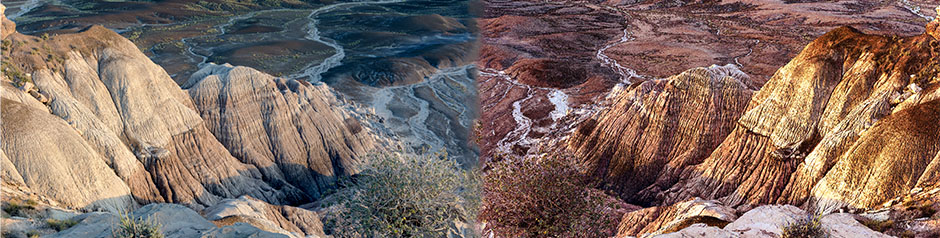
The ensuing dialog has some similarities to PS, with a large rendering of the HDR image and small images showing the range of images used.  An option is not offered for different tone operators, but an option is provided for correcting chromatic aberrations which can occur as a result of the tone mapping.  If you see aberrations, correct then, otherwise click “Create HDR.” HDR Efex Pro gave a much different result then PS, with a much flatter image and both the shadows and highlights brought toward the midtones.  I thought the image less interesting than the PS result, but could make subsequent changes. Clicking OK opened the image back in PS as a 32-bit TIFF file.

RiverGorgeHDR5d

This is the best single image corrected with typical local and global controls, including selection and darkening of the sky, overlay, etc.

RiverGorgeHDRPS

This image is the Photoshop HDR result.


RiverGorgeHDNIK (1)

This is the NIK HDR result, and

RiverGorgeHDNIKMOD

This is the NIK HDR modified by normal workflow after generation of the HDR. You can see that the detail in the shadows is increased for both the cliff and the river.


Michael Freeman, Mastering HDR Photography, Amphoto Books, 2008)
Tagged , | Leave a comment

Multi-image Photography: Part III – Panoramas

…to see the statement of intent that resides in natural form.”  —  John Szarkowski describing the work of Edward Weston in Looking at Photographs.

The world just does not fit conveniently into the format of a 35mm camera.” – W. Eugene Smith

Panoramas are my favorite multi-image approach.  I frequently shoot landscapes and very often the landscape elements are not consistent with camera formats (aspect ratios). Panoramas don’t need to be large numbers of frames; sometimes just 2 frames with an over lap of 20% will be exactly what you need.  Panoramas are relatively easy to produce if you remember three things:

(1)    Level your tripod and your camera.  My tripod has a little circular level that helps a lot.  There are also leveling heads that can simplify the process instead of alternately adjusting each leg.  To level my D200 I use a little bubble level that fits in the hot shoe; it works great.  My D800E has an attitude indicator in the camera that I find convenient because I can then have a GPS unit on the hot shoe, so I use that instead.

(2)    Focus and exposure must be on manual.  You need to set your best average focus point for the entire sequence and not have auto focus decide what is best or the stitching will be obvious; adjust your depth of field appropriately.  You also want a consistent exposure, so go to manual exposure.  Watch out if you frequently use a polarizer.  As you change your camera angle relative to the sun, the polarizing effect will change as well.  You can end up with a distinct change in exposure from one shot to the next, especially for skies.

(3)    Find the nodal point (aka no-parallax point) in your lens.  For telephoto lenses this is generally near the central point of the lens or about where the diaphragm is. For wide angle lenses it gets more complicated rapidly as you go wider and the nodal point can change with the angle of incidence (the amount of rotation).  Finding the nodal point is more critical for scenes that are relatively close.  If you don’t rotate around the no-parallax point, your images may not line up very well. To rotate around the nodal point, long plates that fit an Arca Swiss mount are helpful, so you can slide the camera back and forth along the lens axis until you are at the nodal point.  With my 70-200 mm lens, which has a mounting foot, I am very close to the nodal point without much modification. Usually the images align very well.  With my 24-70 mm which doesn’t have a foot, aligning the images is almost impossible if rotating around the camera itself. The less confident you are about the nodal point, the more space you should leave around your subject, so that if the alignment is off you will still have room to crop.

A web search for “finding the nodal point of a lens” will turn up numerous descriptions that don’t need to be repeated here, but very briefly, two vertical objects are set up, one closer the other further away, that align along the axis of the lens. A telephone pole and building edge can work.  As you rotate the lens around the nodal point, they should remain aligned.  If they don’t then shift the camera back and forth along the lens axis using a long attachment plate, until they remain aligned.

West Quoddy Shore Maine

More often than not, I do a  horizontal pan to capture the full scope and grandeur of a landscape, but I do occasional verticals as well.  Verticals are a little harder

Panoramic view of the tundra in Rocky Mountain State Park

because there is nothing to keep the camera aligned as you tilt upward, instead of rotating with your ball head.

Lower Falls at Hills Creek, WVYou can also do a horizontal panorama with your camera mounted vertically as I did with this image of the “Gossips” in Arches National Park.   Sometimes you don’t need to add much and just two images are sufficient The Gossips, Arches NP, UT

to get what you want with the appropriate foreground and background.

I always rotate left to right so that the frames are taken in the sequence in which they will be stitched, although the program can manage either way.  I usually overlap each frame by 20-25% and as I rotate I try to make sure that right side of preceding frame and the left side of the suceeding frame have some distinctive structure to overlap.

To facilitate processing in Photoshop, I shoot my hand at the beginning and end of each sequence to make it easier to see where the sequence begins and ends.  When naming the files I use a scene name, followed by the number of the panorama for that scene, followed by a letter for the frame sequence.  This can be done automatically in Batch Rename under the tools menu. So for example The first pan of a tundra scene might be TundraPan1a, TundraPan1b, TundraPan1c. If I shot a second pan sequence it would be TundraPan2a, TundraPan 2b, etc.

I usually shoot in RAW, so to begin I select the images in Bridge and double click on one to open them all in camera RAW.  I make lens and chromatic aberration corrections from the lens corrections tab.  I then make other global changes such as exposure, saturation or clarity. I don’t make local corrections such as spot removal. Then “select all” on the left and then synchronize. Click OK if you have not made local corrections; if you have just unclick those such as spot removal or local corrections. This will make the same changes to all of the images so they remain consistent.  Then click Alt-open to Open copies.

Photoshop will open all of the images.  When that is complete, File > Automate > Photomerge. Click “Add Open Files.” Generally the auto layout should work well, but you can experiment. Blend images will be selected by default and click OK.  If your lens has some vignetting that can show up as darker areas where the frames were stitched.  If it was not corrected by lens corrections, you can also click for vignette removal.  Photoshop will automatically place each image on a separate layer with appropriate masks to align them.  I then make sure they are all selected and go to Layer > Flatten image.  I then close the component images to not take up memory (don’t close “untitled panorama or you will have to do it all over again). Often there are slight inconsistencies in alignment so I crop them out, then process according to my normal workflow.

Keep in mind that panoramas also increase the file size of the combined file and give you more pixels to create large images.  The ultimate is the GigaPan that automatically rotates and lowers to capture dozens of images that can be combined to produce sufficient resolution for wall size images.

Keep panoramas in mind when out in the field.  They provide the means to more

NizhoniPtOverlookPan7

accurately capture your vision in some situations by changing the aspect ratio of your final image, rather than cropping, letting you keep the resolution you want, and capturing a scene as you see it without the perspective changes inherent in a wide angle lens.

Friday:  HDR (High Dynamic Range)

Tagged , | Leave a comment

Multi-image Photography: Part II – Composites

I am drawn to art that challenges one’s sense of reality. – Jerry Uelsmann, from a show at Michener Museum in Doylestown, PA

Compositing images, i.e., combining images or parts of images, taken at different times or in different locations, gives the photographer an unlimited number of components with which to write a new story, imagined only in the photographer’s mind and not seen until the photographer assembles the pieces. The images can run the gamut from extremely surrealistic to constructed but believable to apparently realistic.

It can be very difficult to tell a story with a single image or the story may express a limited number of emotions or ideas. By compositing images, more complex stories can be told more clearly and effectively.  Conversely, incongruous juxtaposition can create a mystery or riddle, a pun or joke for the viewer to unfold individually.

Selection tools, layers and masks in Photoshop greatly simplify the construction of composite digital files in comparison to analog images.  This is a very simple composite where the dark brown sand was replaced with a mirrored pattern taken from a rock at the Baltimore Conservatory.

RockPatterns009_SurfAtAssateague010

The warm pattern picks up some of the warm colors in the late afternoon clouds.  Some bubbles from the original image were added back on top of the pattern. This is a more interesting picture than either of the components separately, yet was a very simple selection and substitution.

In the field I liked the appearance of the barn, and it was made more interesting by fog. On the computer,

FoggyBarn (9)

the fog wasn’t as strong as it appeared in the field and making the fog more apparent required an uncomfortable (for me) reduction of contrast.   By combining the barn with two other images from the same trip, I more effectively expressed my feelings about the barn and, more broadly, about the trip.

Using very simple masking to paint out parts of each image and adjusting the opacity of the individual layers I created this composite reflecting my experience.The background layer is the barn, the middle layer is the spider web and the tree is on top.

This next image is still more complex and came out of my daily commute along Fulton Ave. and Monroe Street in west Baltimore.  Those routes are a complex mix of renovated row homes and burned out buildings.  This composite tries to capture

Plants in windows composite.

some of those contradictions with a wild plant growing out of the completely absent window of a burned out building, juxtaposed with a new, well cared for apartment with bright flowers on the window sill.  The chairs, some leaning against the building in denial while others are open and welcoming.

Finally, trying a little harder at social commentary the large background sign advertising free, presumably healthy,

FoodDraft2

food for children and teens, competing against the ads for relatively expensive crabs, alcohol and confections.

Painters always have the option of creating from their imagination.  Photographers now can also fully exercise their imagination with relative ease by creating composite images. As you pursue your usual photographic approach think about collecting images that might not work on their own, but could be combined with other images for a strong and interesting composition.  Patterns of all sorts are often useful, as are relatively simple images that provide a back drop or context for a second or third image.  Books that I found to be helpful include “Photoshop Compositing Secrets” by Matt Kloskowski and “Adobe Photoshop Master Class” by John Paul Caponigro.

Jerry Uelsmann is a master at surrealistic composites, and he does it the hard way, all analog with multiple enlargers, but his images can really get the creative juices flowing, and many of his images are a lot of fun.

Wednesday: Panoramas

Tagged | Leave a comment

Multi-image Photography: Part I – Multiple Exposures

SingleBDMod (1)Those who danced were thought to be quite insane by those who could not hear the music.  – Angela Monet

Multiple image photography has been around for a long time but with digital cameras and software it has become much easier and more flexible to combine images digitally.  Some examples include:

  • Multiple exposures on a single frame.
  • Combining multiple images or parts of images in post-processing (composites).
  • Panoramas.
  • High dynamic range images (HDR).
  • Stacked focus.

It has been my experience that many photographers are aware of the various multi-image techniques but often don’t think of them as solutions or opportunities in the field unless they have specifically gone out to use that effect.  For example, a photographer may switch to a wider angle lens to capture a full scene rather than try a panorama.  Of course the wide angle will give a very different perspective and a panorama may not be the desired solution in some cases, but in others it may provide a different and creative approach. If the only reason for going to a wider angle lens was to include more of the scene, then a panorama may be appropriate. A photographer may also wish to play with creative approaches just for the fun of it — just to see what you get!

Multiple exposures are often used to express motion or to create abstract patterns. Making multiple exposures and moving slightly between each exposure can really

Fall sumac

emphasize and intensify colors. The image on the left shows a single exposure of some bright red sumac in October in Nebraska against a still green backdrop of green leave.

Fall Sumac

By taking multiple exposures the red and green are converted to masses of intense color creating a very different effect.


Moving the camera up and down  for multiple images creates a streak effect particularly suited to

Vertical reflections

vertical subjects like trees and reflections.

Finally, you can obtain an interesting effect with the camera and subject stationary, by de-focusing a second exposure to create a fuzzy aura around your subject, like I did for this orchid. Generally the smaller the f-stop opening

Orchid double exp

(larger numerical value) the more you will need to de-focus because of greater the depth of field.  You can also control sharpness by, for example, shooting 3 images rather than 2, with the first two sharply focused and only the third de-focused.  This would probably work best on a whole field of flowers with fairly bright light, but being November it is difficult to find that field in Maryland.

Multiple exposures also provide a means to composite in camera.  For example, if you are out with a friend you can make a double exposure of that friend coming and going, by taking the first exposure when (s)he is walking in one direction and the second exposure as (s)he is walking in the opposite direction.

In each case you will want to experiment with the number of exposures you take.  Also, as indicated above you can influence the outcome by biasing toward one exposure/focus combination or another (i.e., taking several images at one setting and changing exposure, location, focus, f-stop or other factor to control your final image).

If your camera supports multiple exposures, you may find the options in the shooting menu (or equivalent, depending on your camera).  You will be able to set the number of exposures and turn gain to auto or off.  Auto gain, which is desirable in most cases will automatically adjust your exposure for the number of images that you have set so that the overall image will be properly exposed after the indicated number of exposures have been made. Each image will not be saved separately; you will get only one image after the indicated number of exposures have been made. In general, you will probably want fewer than ten images.  Of course, this type of multi-imaging does not require software since the camera is doing all of the work.

Plan creative sessions using multiple exposures, but also watch for opportunities to use this technique as part of your regular photography.  Situations where it might be relevant include street scenes with people walking by, portraits of the same individual in different or opposite positions or planned compositing in camera.

A skillful use of multiple exposures:  http://www.mymodernmet.com/profiles/blogs/reinhold-adscheid-multiple-exposure-chrono-chorotic-photographs

Next week: composites.
Tagged | 2 Comments

Minimal Photography

…more importantly, simplicity makes things more memorable and useful.  It takes a lot of work to make complex subjects simple, and it well worth the effort.  – David du Chemin

Last week the Baltimore Camera Club had a “themed” print competition:  “minimal photography,” which was not further defined.  I checked on the web for a definition and found it was pretty diffuse and vaguely defined, both in words and by example.  One mentioned component was the use of minimal equipment.  As I don’t believe the equipment used is really relevant to the content of a photo, I sort of ignored that one.  I defined it for my purposes to mean an image that is elegant in its simplicity, having minimal detail that yet conveys meaning, and/or a straightforward composition of masses or colors – a visual haiku. Still pretty mushy, but I had a few images that I thought qualified.  We were able to submit three color and three monochrome images. These are my six, one of which took first in novice color and another took third in monochrome.  Feel free to guess which ones placed, and please, please, submit comments on the images.

Dinghy in fogDouble-crested Cormorant

Chincoteague PinesPaintedDesert029

Divi-Divi Tree, Aruba

Abstract of rock formations

Tagged | Leave a comment